Maelo vs Venue Ink: tattoo bookings and fees
Compare the tattoo booking workflow, who pays the fees, and the difference between deposit-only and full-payment charges.
October 6, 2026
Maelo and Venue Ink both bring tattoo enquiries, bookings and client communication together. Start with the way you book, then compare the complete payment cost. The headline percentages include different things.
Written by the Maelo team, so we are not neutral. Every price below was checked on Venue Ink's, Stripe's and Maelo's own published pages on 6 October 2026. Prices change, so check each company's site for current pricing before you decide. This is a comparison of documented capabilities and Maelo's own product, not a hands-on review of Venue Ink. Worked examples use Canadian dollars and Canadian domestic online cards. Venue's optional subscriptions are billed in US dollars, and we have not converted them.
The difference in pricing
Maelo has no monthly subscription. Its fee is 5% of the deposit, with Stripe processing charged separately. There is no Maelo fee on final payments; processing still applies. You can absorb the estimated fees, include them in the client's price, or choose a share between those settings. Maelo pricing and fee examples.
Venue Ink's pricing page, checked on 6 October 2026, lists Solo at no monthly charge with a 10% fee on card deposits and card payments, including processing. That fee is charged to the client by default, and the artist can switch it to artist-paid or an even split. Solo Pro costs US$50 per month and reduces the rate to 5%. Small payments have a minimum fee: a deposit under C$25 still carries a C$2.50 fee. Venue Ink pricing.
So the two headline percentages measure different things. Compare the deposit, the final balance, processing, any subscription and who pays each amount, as the examples below do.
What a C$100 deposit looks like
For Maelo, assume a C$100 base deposit, the standard 5% Maelo fee and Stripe's published Canadian domestic online rate of 2.9% plus C$0.30. This is an estimate, excluding tax, tips, currency conversion, international cards, disputes and optional services. Your actual processor agreement determines the bill. Stripe Canada pricing.
- At 0% client share, the client pays C$100.00. Maelo receives C$5.00, estimated processing is C$3.20, and the artist receives C$91.80.
- At 50% client share, the client pays C$104.23. Maelo receives C$5.00, estimated processing is C$3.33, and the artist receives C$95.90.
- At 100% client share, the client pays C$108.45. Maelo receives C$5.00, estimated processing is C$3.45, and the artist receives C$100.00.
The share setting divides the price increase needed to cover estimated fees. It does not divide the final processing bill into exactly equal halves. Processing applies to the amount charged, which changes with the setting.
For the same C$100 base deposit, Venue Solo's published default client-paid model adds C$10, making the client total C$110 and the artist's deposit C$100. Processing is included in that C$10. This is a calculation from the published pricing example, not a test transaction.
A month with twenty bookings
A deposit is only part of the job, so here is a whole month on the same assumptions. Twenty bookings, each with a C$100 deposit and a C$400 final balance. Both are paid online by card, and the artist covers every fee, so each product is priced on the same transactions with the same person paying.
- Maelo: C$5.00 Maelo fee and C$3.20 estimated processing on each deposit, then C$11.90 estimated processing on each final balance, with no Maelo fee. That is C$20.10 a booking and C$402.00 for the month, with no subscription. The artist receives an estimated C$9,598.00 of C$10,000.00.
- Venue Solo: 10% of C$500 is C$50.00 a booking, processing included. That is C$1,000.00 for the month, and the artist receives C$9,000.00.
- Venue Solo Pro: 5% of C$500 is C$25.00 a booking, or C$500.00 for the month, plus the US$50 subscription. The artist receives C$9,500.00 before that subscription.
In this example Maelo costs less in total. Your own result depends on your deposit sizes, how often the balance is paid by card, and the plan you choose. A card tapped in person costs a little less on Stripe's published in-person rate, so we used the higher online rate for Maelo here.
If clients cover the fees instead, the combined cost moves rather than disappears. On Venue Solo's default setting, the client pays C$550 for a C$500 booking and the artist receives C$500. On Maelo at 100% client share, the client pays C$108.45 for the deposit and C$400 for the balance, and the artist receives an estimated C$488.10, because processing on the final balance stays with the artist.
Follow one custom tattoo from enquiry to booking
Imagine a client requesting a botanical forearm piece. They have three reference images, an approximate size and two possible dates. You need to review the idea before agreeing a price and duration.
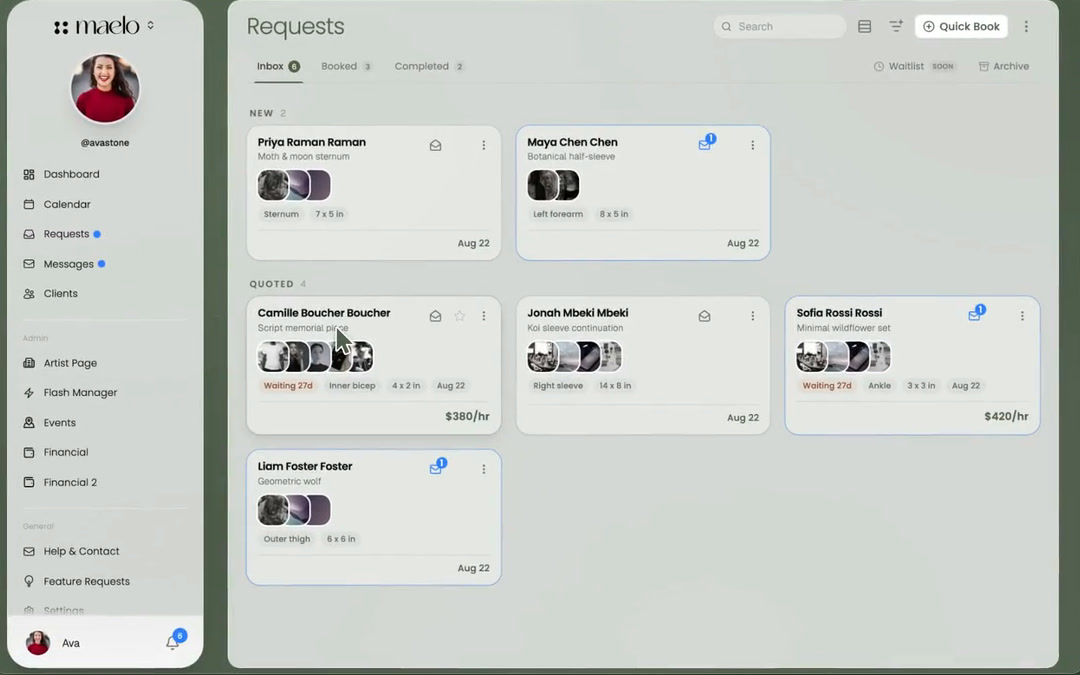
In Maelo, build the questions in your booking form. The field guide explains reference uploads, dimensions and date choices. The brief arrives in the requests inbox, where you can review it and build a quote. The approval and deposit guide follows the next step.
Venue also describes artist review before scheduling, custom forms, flash, client chat and Google Calendar blocking. Its booking page describes concierge help with form changes and migration. It is worth checking the current editing experience in a demo, rather than assuming that page describes every account today. Venue booking workflow.
Use the same sample enquiry to assess both products. Check whether the reference images remain beside the brief, how a changed quote reaches the client, and where the deposit and appointment appear. Repeat it on the phone you actually use at work. We have not timed these tasks or compared completion rates.
For flash, try a second example: one design, one available booking, and a client asking for a different placement. Maelo's flash workflow is separate from a custom enquiry. Venue also documents flash sales. Test the reservation and follow-up steps before moving a whole collection.
When Venue may suit you
Venue is worth evaluating if you want human help transferring your existing booking setup. For a studio, its published tools include a shared calendar and moving requests between artists, and its Studio Pro plan (US$150 per month) adds automatic payment splits. Those may matter more than an individual deposit example. Confirm the relevant plan and setup with Venue. Venue migration help and studio tools.
This article evaluates Maelo for an independent artist. It does not establish parity with Venue's studio operations or make a promise about migration.
When to try Maelo
Try Maelo if you want to edit your booking page and intake questions yourself, review requests with their references, and keep quotes, messages and appointments together. Look at the demo artist page, then use the existing getting-started guide to make your own.
Before switching, inventory your future appointments, deposit balances, client records, attachments and consent records. Confirm which items can move and which need manual handling. Keep access to old records until every outstanding appointment and payment is accounted for. We have not verified an automatic Venue-to-Maelo importer.
Prices and features in this article were checked on 6 October 2026 and can change at any time. Check Venue Ink's pricing and Maelo's pricing for current figures. If a source here changes or a capability is missing, contact Maelo. The useful comparison is the one that helps you choose, including when you stay with your current system.
Try the booking workflow
Build a page and a request form, then see how your next enquiry would arrive.
Get started